What is VA Mode?
If you work with a virtual assistant or employee to manage your Amazon Influencer account, you've probably invited them as a user inside your Amazon affiliate account settings. The problem? Those invited user accounts behave differently than your main login and that causes certain Viral Vue features like uploading content or tagging products to break. VA Mode lets your VA or team member operate Viral Vue on your behalf, without hitting those access errors.
Who needs VA Mode?
Only accounts where someone other than the account owner is doing the work. If you manage your own account solo, you can skip this feature entirely.
How to set up VA Mode 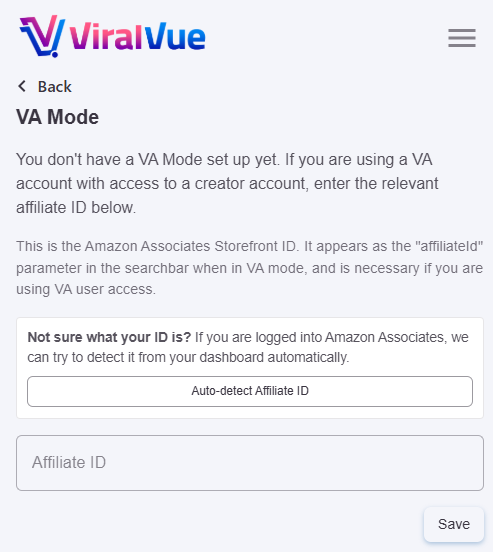
- Send your VA an invite on Amazon. The VA must have an active user invite on your Amazon Influencer account so they can access the features they'll be helping with.
- Your VA logs in with your Viral Vue account. They do not use their own Viral Vue login — they sign into the extension using your credentials to keep all activity under your account.
- Your VA enters your affiliate ID in VA Mode settings. Inside the extension, they navigate to the VA Mode section and enter your affiliate ID. This ensures all activity and earnings are correctly tracked to you.
- You're all set. Your VA can now manage your Amazon Influencer account through Viral Vue.
FREQUENTLY ASKED QUESTIONS
Does my VA need their own Viral Vue account?
No. Your VA logs into Viral Vue using your account credentials, not their own. This keeps all activity and earnings connected to your account.
What does the affiliate ID do in VA Mode?
Your affiliate ID tells Viral Vue which account to attribute all activity and earnings to. Your VA enters your affiliate ID, not theirs, so everything is tracked correctly under your name.
How do I disable VA Mode?
Click the Viral Vue extension, click the Menu icon, then VA Mode, remove the affiliate ID showing, and click Save.
Need More Help? Use the support chat widget on our Help Center and our team will be happy to assist you.